
Panda Mouse Pro
Panda Gaming StudioTools
4.3363.00 Reviews
- Version
- 12.4
- Installs
- 100.00K
- Age Rating
- Everyone
Screenshots
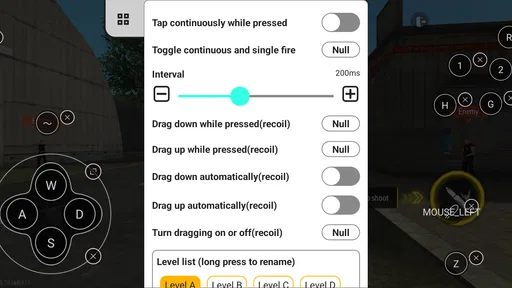
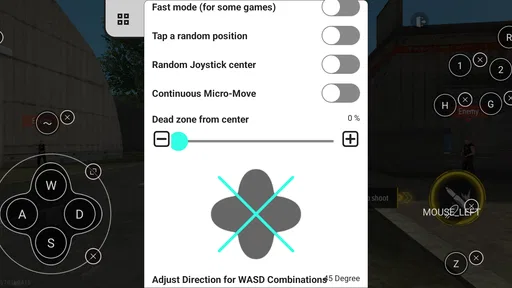
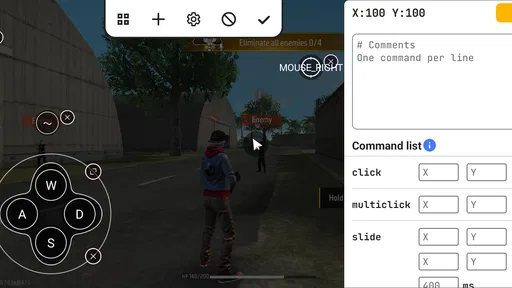
Our Review of Panda Mouse Pro
 Analysis by Appyee
I find the most interesting thing about Panda Mouse Pro is not simply that it lets you connect a keyboard and mouse to an Android device. It is the idea of translating those familiar controls into actions on a phone screen. That can make a mobile game feel more manageable when touch controls demand several fingers at once, or when your hand keeps covering the part of the screen you need to see. The payoff depends on the game and on how much setup you are willing to do, but the core appeal is clear: more deliberate control using familiar peripherals.
What control mapping changes
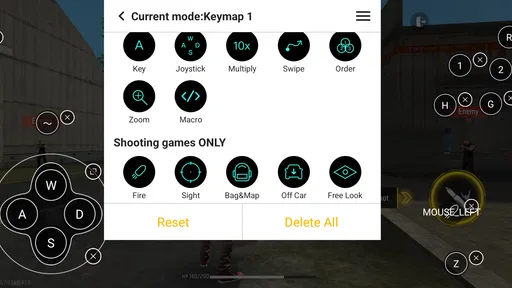
Keyboard-and-mouse mapping is useful because it gives certain actions a physical place. Instead of tapping a virtual button, you can assign an input to a key; instead of dragging a finger across the display, you can use a mouse to guide movement or aim where the game allows it. That does not turn every mobile title into a PC game, and it cannot change how a game itself is designed. It does give you another way to interact with the on-screen controls.
For a game with several simultaneous touch actions, that distinction can matter more than raw speed. I would think of the app as a control translator, not as a shortcut that automatically makes a player better. A thoughtful layout can reduce awkward reaches and make repeated actions easier to perform consistently. A careless layout can be worse than touch, especially if important keys are hard to remember or a mouse movement does not match the game’s camera behavior.
Making the first session useful
Before settling into a long session, I’d use a game’s practice area, tutorial, or a low-pressure match to check the basic inputs. Start with the actions you use most, such as movement and the main interaction, then add less frequent actions only after the essentials feel natural. This staged approach makes it easier to identify whether the trouble comes from the mapping, the game’s own controls, or simply a layout that asks your hands to do too much.
It is also worth testing the setup in the same physical position you expect to play in. A keyboard on a desk and a phone propped nearby feel different from holding the phone while using peripherals, and a layout that works in one position may be uncomfortable in another. I would keep the first configuration simple, play for a short spell, and adjust one thing at a time. Changing several mappings at once makes it harder to tell which change helped.
Who benefits, and when touch is better
This approach is most appealing to people who already own a compatible keyboard and mouse, enjoy experimenting with controls, and play titles where precise pointing or repeated key actions are a genuine part of the experience. It can also suit someone who finds on-screen buttons cramped, provided the game’s actions can be mapped in a way that remains comfortable. If you mostly play casual games designed around quick taps and swipes, the extra equipment and setup may be more hassle than value.
Touch controls remain the simpler choice when you want to pick up the phone and start immediately, when you play while travelling, or when a title depends heavily on gestures. A controller may be a better alternative for games built around sticks and buttons rather than aiming with a mouse. I would not buy peripherals just for this app without first considering whether I would actually use them elsewhere; the app’s usefulness is tied to a physical setup and to the games that suit it.
Practical checks before committing
Compatibility deserves attention before you plan a session around a particular game. The fact that a title runs on Android does not mean it will respond well to mapped keyboard and mouse input. Check whether the game’s on-screen actions can be represented cleanly, then test the controls rather than assuming a familiar PC layout will transfer perfectly. Games can differ in how they handle aiming, movement, menus, and simultaneous actions, so a layout that feels sensible in one may need a different approach in another.
One useful habit is to keep a note of the few mappings that feel unintuitive, especially if you switch between games. That small reference can save repeated trial and error without forcing you to memorize every setting at once. If a control feels unreliable, simplify the layout and test again before making the whole setup more complicated. This is a practical way to separate a genuine limitation from an adjustment that just needs refinement.
Setup expectations and fair play
There is a difference between pairing peripherals and getting a workable control scheme. The original setup discussion points out that enabling settings can be part of the process and that rooting may be required depending on the Android version. That makes this less suitable for someone who expects a one-tap accessory experience. I would check the steps for my own device before paying, and I would avoid changing system-level settings unless I understood what they do.
There is also a competitive consideration: a mouse can offer a different kind of precision from a finger, but games set their own rules about input methods. Before using a mapped setup in a ranked or otherwise competitive mode, I would check the game’s rules and choose a mode where the control method is allowed. The point is not only to avoid trouble; it is to make sure the experience stays fair for everyone involved.
The app is a paid Tools app from Panda Gaming Studio. It costs $5.99, carries an Everyone age rating, and has optional in-app purchases priced at $1.99 per item. Its current version is 9.2, and it runs on Android 6.0 or later. It has a 4.2 average from around 24,000 ratings, with over 100,000 installs. Those figures suggest an established audience, but they cannot tell you whether your particular games and device will suit the setup. I’d base that decision on the games I actually play and my tolerance for configuration.
My practical recommendation is to treat the purchase as a tool for a specific control problem, not as an automatic upgrade for every game on your phone. If one or two games are much more comfortable with a keyboard and mouse, and you are willing to do some careful setup, it may earn a place in your routine. If you value instant access, mainly play touch-first titles, or do not already have the peripherals, the usual touch controls—or a controller for games designed around one—are likely the more sensible choice.
Have you ever felt the frustration of trying to play your favorite mobile game with touch controls that just don’t cut it? Well, let me introduce you to Panda Mouse Pro. This app is like a breath of fresh air for gamers who want more control over their mobile gaming experience.
Getting Started with Ease
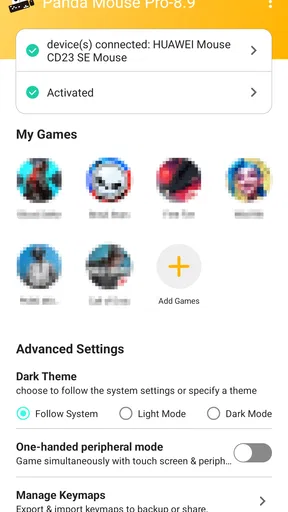
First things first, installing Panda Mouse Pro is a breeze. After downloading it from your app store, you’ll need to connect your mouse and keyboard to your device. The app requires a bit of setup, but don’t worry, it guides you through each step. You’ll need to enable some settings and perhaps even root your device, depending on your Android version, but it’s all straightforward.
Why Use Panda Mouse Pro?
If you’re a serious gamer, you know how crucial precise controls can be. This app allows you to map your keyboard and mouse controls to your mobile screen, turning your gaming experience from "meh" to "wow!" Whether you’re playing shooters, RPGs, or even strategy games, having a mouse and keyboard in your arsenal can make all the difference.
Let’s face it, touch controls can be limiting, and sometimes downright annoying. By using Panda Mouse Pro, you can finally aim and shoot with pinpoint accuracy, or move your character with the fluidity that touch controls just can’t match.
Features That Stand Out
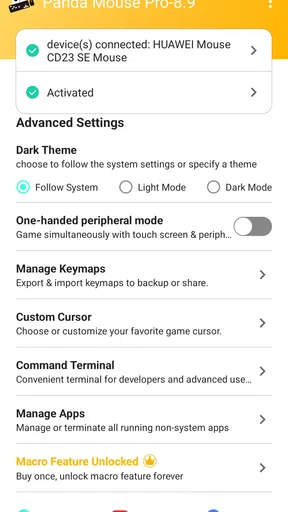
One of the standout features is its versatility. The app supports a wide range of devices and game genres. It even lets you create different profiles for different games, so you can switch easily without having to remap controls every time. This is a lifesaver if you're into multiple game genres.
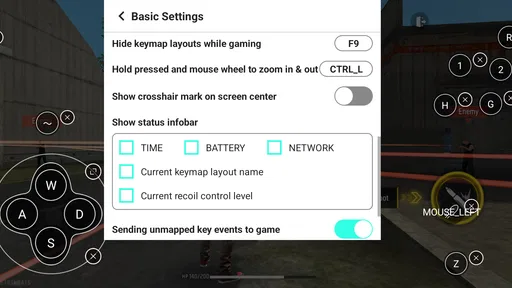
Another great feature is the user-friendly interface. It’s intuitive enough that even if you’re not tech-savvy, you can get your setup done without pulling your hair out. The app also offers customizable settings, allowing you to fine-tune things like sensitivity and response time to match your play style.
Real-World Usage
So, how does it perform in the real world? In my experience, it’s a game-changer. I tested it with a variety of games and was genuinely impressed by how smooth the gameplay was. No lag, no missed inputs—just seamless control. It’s like having a mini gaming rig in your pocket.
However, it’s worth mentioning that it might take a bit of trial and error to get everything just right. Once you do, though, you’ll wonder how you ever played without it.
Things to Keep in Mind
Now, while Panda Mouse Pro is fantastic, it does come with some caveats. The app requires a bit of technical know-how to set up, especially if rooting is required. Additionally, not all games support keyboard and mouse input, so it’s best to check compatibility beforehand.
Another point to consider is the cost. While the app isn’t free, the investment is well worth it if you’re serious about gaming. It’s a small price to pay for such a significant upgrade to your gaming experience.
Lastly, remember that using a mouse and keyboard might give you an edge in competitive games, so be mindful of the in-game rules and fair play policies.
Final Thoughts
If you’re looking to elevate your mobile gaming, Panda Mouse Pro is a must-try. It bridges the gap between mobile and PC gaming, offering a level of control that touchscreens simply can’t provide. Whether you’re a casual gamer or a hardcore enthusiast, this app can transform your gaming sessions into something truly enjoyable.
So, why not give it a shot? Download Panda Mouse Pro today and experience the difference for yourself. Happy gaming!
Verdict
Strengths of Panda Mouse Pro
- Supports most Android devices seamlessly.
- Allows customization of key mappings.
- Low latency for gaming precision.
- User-friendly interface and setup.
- Regular updates improve performance.
Limitations of Panda Mouse Pro
- Requires root access on some devices.
- Limited support for iOS devices.
- Occasional connection stability issues.
- In-app purchases can be expensive.
- Compatibility varies with different games.
Other Releases by Panda Gaming Studio
View All
Panda Gamepad Pro
Tools4.0
Similar Picks in This Category
View All
Google LLC4.0

Gboard - the Google Keyboard
Google LLC4.5

Google Play services
Google LLC4.3

Google Play Store
Google LLC4.9

Files by Google
Google LLC4.5

SHAREit: Transfer, Share Files
Smart Media4U Technology Pte.Ltd.4.3
Frequently Asked Questions
What is Panda Mouse Pro, and how does it work?
Panda Mouse Pro is an Android application designed to enable users to connect a mouse and keyboard to their mobile devices for enhanced gaming experiences. It works by providing a seamless interface that maps mouse and keyboard inputs to touch controls, allowing for better precision and control in games.
Is Panda Mouse Pro compatible with all Android devices?
Panda Mouse Pro supports a wide range of Android devices. However, compatibility is not universal. Users should ensure their device supports OTG (On-The-Go) and meets the app's minimum system requirements. It's recommended to check the app's description on the Play Store for specific compatibility details before downloading.
Does Panda Mouse Pro require root access on my device?
No, Panda Mouse Pro does not require root access. However, it does need a specific activation process using a PC to enable the necessary permissions. This process is straightforward and well-documented within the app, ensuring users can set it up without rooting their devices.
Are there any in-app purchases or subscriptions in Panda Mouse Pro?
Panda Mouse Pro is a paid application, meaning users need to purchase it to access its features. Once purchased, there are no additional in-app purchases or subscriptions required. Users gain full access to all functionalities without additional costs after the initial purchase.
What games are best suited for use with Panda Mouse Pro?
Panda Mouse Pro is particularly beneficial for FPS (First-Person Shooter) games, MOBAs (Multiplayer Online Battle Arenas), and any game that benefits from precise controls and fast inputs. Popular games like PUBG Mobile, Call of Duty: Mobile, and Mobile Legends are well-suited for use with this app, enhancing gameplay experience significantly.
